For educators and trainers
Turn your teaching notes into a finished video course.
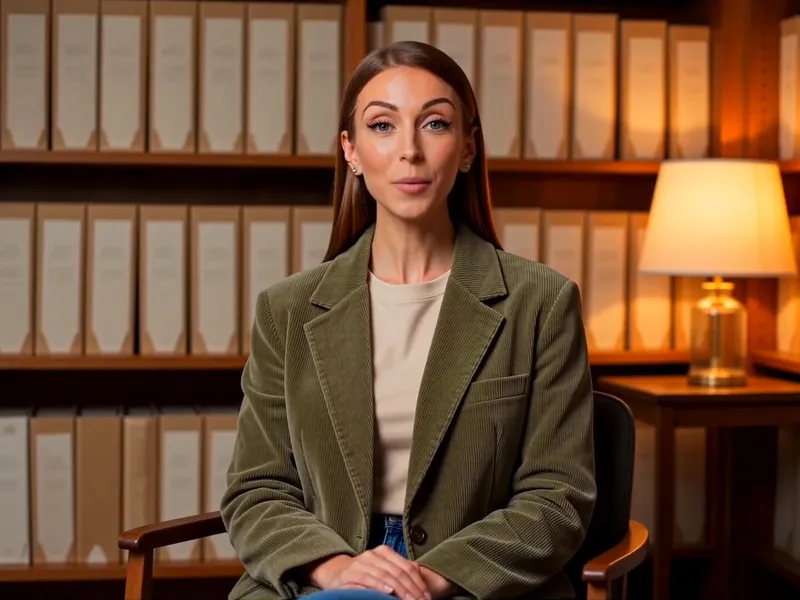
AI-generated presenter
Introduction to Economics · Supply, demand and market equilibrium1:48
Presenter on screenSlides with narration
Share your topic or notes and CourseIO builds the whole course, with video lessons, an AI presenter, slides, captions and quizzes in over 50 languages.
5 free lesson credits when you sign up · No credit card needed
Works with
What you get
You get the whole course, not just one video.
Outline
Modules and lessons, in your order
Lesson videos
Narrated and captioned
Slides
Timed to the narration
Quizzes
A quiz for every module
Notes
Downloadable for learners
Course package
For Moodle, Canvas and more
Judge it yourself
Watch a real course that CourseIO made.
Nothing here was edited afterwards. Watch it, read the slides, take the quiz.
AI-generated presenter
Presenter opens the lessonSlides carry the teachingCaptions on every line
How it works
One Topic. A Complete Course.
Bring a topic or your notes. We do the rest.
Your brief
Introduction to Economics for first-year undergraduates.
English Sigrid · presenter
Sigrid · presenter1You do this
Type a topic
One sentence is enough.
How do you want to build it?
Quick generateThe whole course in one go
Step-by-stepReview and approve each stage
2You do this
Pick a mode
In one go, or approve each stage.
Course ready · send it to




or download MP4 · PDFPublish
3You do this
Publish
Moodle, Canvas, YouTube, Vimeo, or download.
Step-by-step mode
Want to check every stage? Go step by step.
Go step by step and you see the outline first, then each stage as it is made. Rename, reorder, add or remove, and attach your own notes, slides or reading to any lesson so it is written from them.
DOCXLecture notes.docxAttached to 1.1
PDFSyllabus.pdfAttached to 2.2
PDFReading list.pdfAttached to 1.2
MP3Recording.mp3Attached to 2.1
Course outline
Module 1 · Supply and demand
- 1.1 Supply, demand and equilibriumLecture notes.docx
- 1.2 What moves the demand curveReading list.pdf
- Module quiz
Module 2 · Elasticity
- 2.1 Price elasticity of demandRecording.mp3
- 2.2 A worked exampleSyllabus.pdf
- Module quiz
Approve outline
The CourseIO engine
Then the engine does ten production jobs while you watch.
The moment you start the build, the engine starts. It does every production job in order and shows you each one as it finishes.
Course finishedIntroduction to Economics
All 10 steps done100%
- 01Course planDone
- 02Lesson scriptsDone
- 03NarrationDone
- 04SlidesDone
- 05VisualsDone
- 06CaptionsDone
- 07SyncDone
- 08VideoDone
- 09QuizzesDone
- 10NotesDone
Course finishedIntroduction to Economics
All 10 steps done100%
01Done
Course plan
Modules and lessons, from your brief
02Done
Lesson scripts
What each lesson will say
03Done
Narration
A natural voice, in your language
04Done
Slides
Designed for each lesson
05Done
Visuals
Images and graphics added
06Done
Captions
On-screen subtitles
07Done
Sync
Matching slides to the narration
08Done
Video
Everything joined into finished videos
09Done
Quizzes
A quiz for every module
10Done
Notes
Downloadable notes for learners
Live. No refreshing, no guessing.In order. Each job builds on the one before.Hands-free. Close the tab and come back to a finished course.
The time you get back
Weeks of work by hand. Minutes with CourseIO.
Outline, scripts, slides, recording, editing, captions, quiz and notes take one to two weeks by hand. CourseIO does all of it in minutes.
By hand1–2 weeks
Outline
Scripts
Slides
Recording
Editing
Captions
Quiz & notes
Outline · Scripts · Slides · Recording · Editing · Captions · Quiz & notes
With CourseIOMinutes
One brief in, the whole course out.
NEWAI presenter
A presenter on screen, without a camera.
Choose a presenter to open each lesson, return in the middle and close it, lip-synced to the narration.
- Speaks in the voice and language you picked
- On screen for up to 40 seconds per lesson
- Always marked on screen as AI-generated
- One extra credit per lesson with a presenter
 Selected


+25more
Where your course goes
Then put your course where your students already learn.
Add it to your university’s learning platform, publish it to your video channel, or keep the files.
 Finished course
Introduction to Economics
- Lesson videos
- Slides
- Quizzes
- Notes
Your learning platform
Import 1 fileQuizzes come across with the lessons.


Video sites
Publish directlyLesson videos go straight to your channel.
Your computer
DownloadKeep every file for yourself.
VideosSubtitlesSlidesNotes
Learning platforms: download one file and import it. YouTube and Vimeo: connect your account once, then publish from CourseIO.
Who it’s for
It is made for lecturers, trainers and teaching teams.
Lecturers and instructors
Turn your syllabus and reading material into video lessons with a quiz for every module, packaged for your learning platform.
MoodleCanvasBlackboardBrightspace
Independent trainers
Turn the workshop you already run into a recorded course, without hiring a video editor.
MP4YouTubeVimeo
Training a team?
Need the same training in several languages? CourseIO narrates and captions in 50+. Tell us what you need.
Book a 20-minute callYours to keep
Download everything, any time.
Encrypted
In transit and at rest.
Private to your team
Only your team can see your courses.
Never used to train AI
Your material stays yours. How we handle data
5 lesson credits when you sign up, with no credit card. One credit makes one lesson of up to 6 minutes, with video, slides, captions and notes.
Start free today and get back to teaching.
Make your first course today.
- 5 free lesson credits
- No credit card
- Works with Moodle and Canvas